
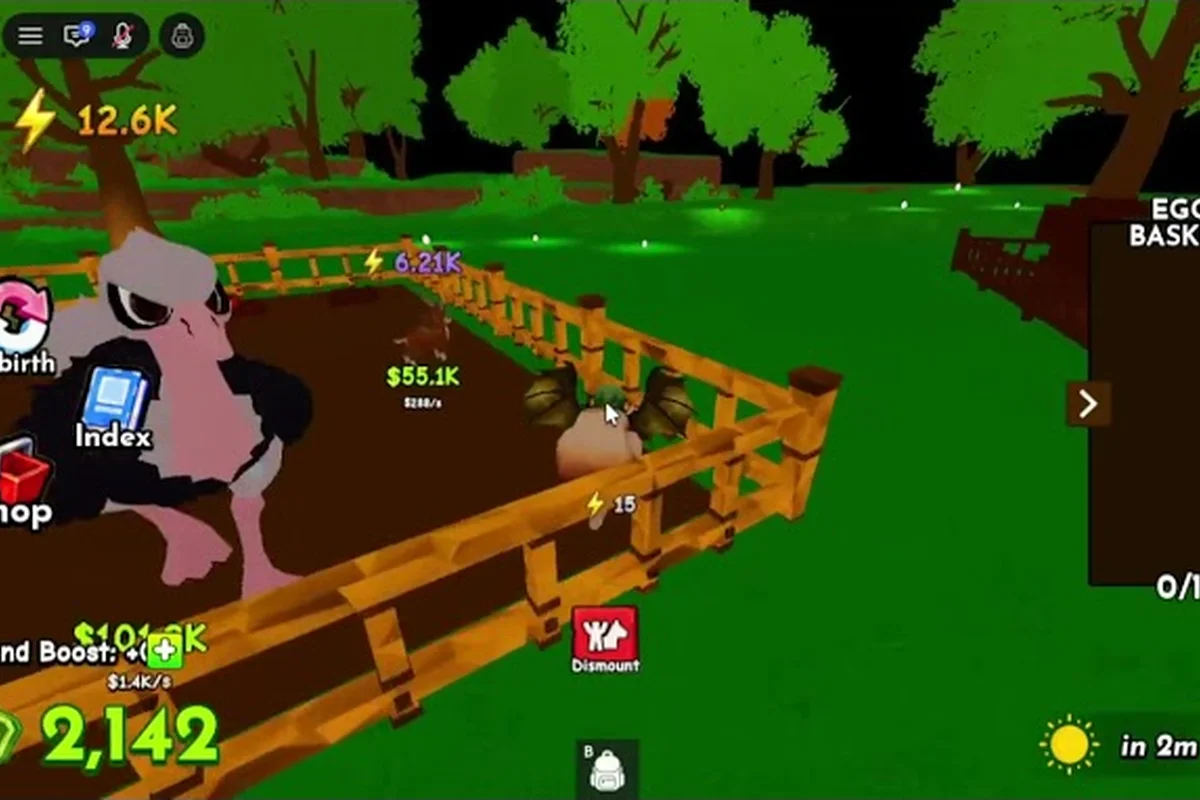
A cluttered backpack in Ride A Pet is the silent killer of a good session. Every nest you crack adds another pet to the review pile, and if your slots are full when a rare hatches, you risk deleting something valuable by accident. This inventory-focused walkthrough breaks down how to manage backpack space, how the radar works for tracking rare eggs, and which convenience passes actually save time for free-to-play players who want to keep grinding without overspending Robux.
Understanding the Ride A Pet Backpack System
The backpack in Ride A Pet is the inventory layer that holds every pet you have hatched. According to the official Ride A Pet page on Roblox, storage capacity is the main bottleneck for active players: if you hatch faster than you review, you either delete good rolls or stop riding to clear space. The backpack is presented on the store page as storage rather than as a power boost, which is the first hint that it is a quality-of-life layer, not a progression shortcut.
Backpack Capacity and Slot Pressure
The default backpack starts with a small number of slots that fills up faster than most newcomers expect. Each ride session can pull in 5 to 15 new pets depending on your route density, your mount speed, and how many nests you cross. The slot ceiling is what the developer group describes as a soft gate: a free player with a tight route can still clear most of the map, but they have to make hard decisions about which pets to keep and which to recycle.
Slot pressure gets worse once you start targeting rarer eggs. A fast pet lets you hit more nests per hour, which inflates the daily hatch count, which in turn inflates the number of review decisions you have to make. The community-run YouTube channel covering Ride A Pet egg routes illustrates this in its egg-collecting video, where every nest added another decision point to the loadout. The practical takeaway: your backpack is not just storage, it is your decision budget for the session.
| Backpack State | Symptom | Recommended Action |
|---|---|---|
| Under 50% full | Comfortable, low pressure | Keep hatching, review later |
| 50% to 80% full | Slow reviews after each ride | Pause to recycle weak pets |
| Over 80% full | Risk of deleting good rolls | Clear space before next run |
| Full | Cannot pick up new pets | Stop riding, full audit |
When the Infinite Backpack Pass Makes Sense
The Infinite Backpack game pass is listed at 499 Robux on the official store page. According to the developer community at the "this game is gud" Roblox group, the four convenience passes (backpack, radar, instant hatch, auto collect) do not change hatch odds or pet rarity. That makes the backpack pass a time-saver rather than a progression gate, which means the right time to buy it is when slot pressure is actively costing you sessions, not when you feel like you should "upgrade."
A useful self-test: if you have deleted at least two strong pets in the past week because you ran out of space, the pass pays for itself in saved regret alone. If your backpack rarely fills, save the Robux for a different pass. If you want a deeper cost-benefit breakdown of the Infinite Backpack and the Infinite Radar side by side, the Ride A Pet gamepass breakdown walks through the value math in more detail.
What the Radar Screen Tells You
The radar is the second half of the inventory equation. Where the backpack controls what you keep, the radar controls what you find. A working radar means fewer wasted rides to empty nests and more time hitting spots where rare eggs actually drop.
Tracking Nests on the Radar HUD
The radar shows nearby eggs or nests on your HUD as you ride. Distance matters: the closer the blip, the faster you can reach it, which means the radar rewards map knowledge. Players who memorize high-density zones get more value from the same radar than players who chase every ping across the map. The community describes the default radar range as "useful but short," which is why the Infinite Radar pass is the second-most-discussed upgrade after the backpack.
Reading the radar well comes down to three habits that turn raw blips into faster inventory growth: each habit is a micro-decision about where to spend your next 5-10 seconds of riding, and the combined effect compounds across a full play session. Players who internalize these habits report collecting 20-30% more eggs per hour than those who react to every ping, because the radar only re-registers nests when you physically re-enter their detection radius, making every sweep count.
-
Glance, do not stare: the radar updates as you move, so a quick check every few seconds beats staring at it.
-
Prioritize the nearest cluster: three blips in one direction beats one blip across the map, because you can sweep them in one ride.
-
Ignore stale pings: once you pass a nest, its blip fades. Trust your eyes more than a fading signal.
Combining Radar Routes With Backpack Space
A common mistake is treating the radar and the backpack as separate systems. They are tightly linked: a strong radar without backpack space means you will see rare eggs you cannot pick up, and a big backpack with a weak radar means you will ride past the nests that would fill it. The smart play is to plan each session around both.
| Session Goal | Radar Priority | Backpack State Needed |
|---|---|---|
| Farm commons | Any radar works | At least 30% free |
| Hunt rare eggs | Infinite Radar ideal | At least 50% free |
| Group reward run | High-end radar | Full clear before start |
| Casual exploration | Default radar | No pressure |
Players who want to chain radar hits into group runs should also look at the Ride A Pet group rewards guide to see how a coordinated team can share radar data and split nest visits, which multiplies the value of every backpack slot.
Ride A Pet Radar Guide: Tracking Rare Eggs
A good radar turns a five-pet run into a fifteen-pet run, and the difference between a default radar and an upgraded one is mostly about how often you reach a nest before someone else does. Here is how to actually use the radar to chase rare eggs without burning your entire Robux budget on passes.
Building a Rare-Egg Route
The fastest rare-egg hunters in the community do not rely on a single hot spot. They chain three or four high-probability nests into a single sweep, then loop back to the starting area. The radar is what makes this loop work: it tells you which of your target nests is still occupied, so you skip the empty ones and ride straight to the live ones.
A practical rare-egg loop in Ride A Pet treats the radar as a clock, not a flashlight: you open the sweep, ride the blips in spawn-fresh order, and return to base before the ping window fades. Plan three candidate nests with overlapping radar range so at least one blip is almost always live, and cut the ride length under 90 seconds to stay ahead of the radar cooldown — the loop only works if the last nest resolves before the signal dims.
-
Start at your home nest and ping the radar for the nearest blip.
-
Ride to the closest occupied nest and crack the egg before moving on.
-
Pivot to the second blip in the same direction, chaining the route.
-
Loop back through a low-traffic area to catch pings that appeared while you were riding.
-
End at a safe zone to review the new pets while your radar cools down.
The cooldown matters. According to community data shared in the "this game is gud" developer group, the radar does not ping continuously at full strength, so ending each loop with a brief review window lets the next sweep start fresh. Players who ignore cooldowns report "dry runs" where the radar feels broken, when in reality it just needed a reset.
Default Radar vs. Infinite Radar
The Infinite Radar pass removes the range cap and shortens the cooldown, which translates into more hits per session. The pass does not increase the rarity of the eggs you find, only how often you find them. That distinction matters because it changes the math: if you already have a tight route, the default radar can keep up. If your route is loose or you play in crowded servers, the upgrade pays for itself faster.
| Feature | Default Radar | Infinite Radar Pass |
|---|---|---|
| Range | Short, line-of-sight bias | Full map, persistent |
| Cooldown | Noticeable between pings | Minimal reset time |
| Rare egg hit rate | Decent on quiet servers | Strong on crowded servers |
| Robux cost | Free | Paid pass (see store) |
| Best for | Solo, low-traffic play | Group runs, busy hours |
The 499 Robux price tag on the Infinite Backpack is mirrored by a similar tier on the Infinite Radar. If you have to pick one, choose the one that solves your current pain point: full backpack or empty nests. The Ride A Pet gamepass cost analysis covers how to weigh the two passes if your budget only allows one.
Group Rewards and Inventory Synergy in Ride A Pet
Group rewards change the inventory math in a way most free players underestimate. When you join the official developer community, you unlock bonuses that feed back into the same backpack and radar loop, which is why a guide to ride a pet how to join group rewards belongs in any inventory-focused article.
Why the Developer Group Matters for Inventory
Joining the "this game is gud" Roblox community is free, and it stacks with the radar and backpack passes rather than replacing them. According to the developer group page, members receive occasional egg drops, bonus codes, and priority access to limited-time nests. None of these bonuses inflate your backpack size directly, but they all add more pets to your review queue, which means you need either a clear loadout or extra space to absorb them.
The synergy is simple: every developer group reward — whether a free egg drop, a priority nest window, or a limited-time bonus code — funnels extra pets into your backpack without expanding the slot cap, so the practical effect is a higher hatch-to-storage ratio. That means your radar guide habits need to account for the possibility of three or four new entries arriving from a single group event, and your backpack review pass should default to "keep or merge" decisions rather than "auto-delete" since rare drops from priority nests are exactly the kind of inventory weight that compounds over a weekend play session.
-
More nests visited: radar upgrades and group nests mean more hits.
-
More eggs hatched: each nest means another pet to review.
-
More slots needed: rare drops from group events cannot be auto-deleted.
-
More decisions per session: your review time scales with the group bonus.
| Group Bonus Type | Inventory Impact | Recommended Prep |
|---|---|---|
| Free egg drops | +1 to +3 pets per event | Clear 20% of backpack first |
| Bonus codes | Variable rewards | Check before redeeming |
| Priority nests | Higher rare chance | Bring a full clear mindset |
| Community tips | Better routes | Save radar data notes |
Ride A Pet How to Join Group Rewards Step by Step
Joining the official "this game is gud" group is straightforward, but the inventory prep around it is what most players skip. Group events flood your backpack with pet eggs, fruit stacks, and event-only bait in bursts, so without pre-clearing 30%+ space and confirming your radar is online, the priority nests respawn while you are still trashing grey-tier pets to make room — Here is the cleanest path to capturing group rewards without trashing your backpack mid-event:
-
Search for the group on Roblox: look up "this game is gud," which is the official developer community linked from the game page.
-
Click Join: membership is free, and approval is usually instant.
-
Verify your rewards tab: open the in-game rewards window to confirm the group tag is active.
-
Pre-clear your backpack: target at least 30% free space before the next group event starts.
-
Check your radar: make sure it is in working order so you can hit the priority nests first.
-
Redeem codes during the event window: codes shared in the group often expire within hours.
If you are also weighing whether to invest Robux into the backpack pass to absorb the extra group rewards, the Ride A Pet Robux spending guide covers how to budget Robux across passes, eggs, and group events without overspending on a single convenience layer.
Advanced Inventory Strategy and Pass Decisions
Once you have the basics down, the next step is to think about your inventory as a session-long budget rather than a static storage bin. Players who treat it that way consistently outperform players who just keep hatching and hope for the best.
Session Planning Around Slot Budget
The slot budget is the number of free spaces you start a session with. Plan every ride with a target budget: how many pets do you intend to hatch, and how many are you willing to delete at the end. A solid default is to keep at least 20% of your backpack free at the start of any session, which gives you a buffer when a rare egg shows up unannounced.
| Session Length | Target Free Slots | Reasoning |
|---|---|---|
| 15 minutes | 5+ slots | Short sweep, low pressure |
| 30 minutes | 10+ slots | Mid-length route |
| 60 minutes | 15+ slots | Full loop, group runs |
| Event runs | 20+ slots | Rare egg buffer |
Players who map out their session against the slot budget rarely pause mid-route to recycle commons, and that uninterrupted window matters because radar cooldowns, group reward check-ins, and bike refresh events all favor continuous movement rather than back-and-forth menu trips. Pre-clearing low-tier pets and locking valuable hatches into safe slots also keeps the backpack ready when a high-rarity egg hatches mid-loop, letting riders scoop it up without scrambling for inventory space.
When to Pass on Every Convenience Pass
Not every player needs every pass. The four convenience passes (backpack, radar, instant hatch, auto collect) solve four different problems, and buying all four at once drains your Robux without addressing the actual bottleneck. Diagnose first, then spend. A player who only opens Ride A Pet twice a week for hatching sessions will never recoup the 799 Robux auto collect price through saved clicks, while a grinder running 10+ pet reviews per session recoups the backpack upgrade inside two sittings because each review of a 40-slot yard is roughly 90 seconds of menu scrolling the backpack pass deletes entirely. Match the pass to your actual Ride A Pet inventory guide workflow, not to a wishlist.
Walk through these three diagnostic questions before pulling out your wallet, because each one maps directly to a specific Ride A Pet convenience pass and forces a clear yes-or-no decision that the 799-to-999 Robux price tags demand: identifying your single biggest time sink tells you which of the four convenience passes — backpack, radar, instant hatch, or auto collect — actually pays for itself, your weekly session count reveals whether your play volume can recoup the cost before you quit the grind, and naming a specific rare pet (Mythic-tier, limited event) reframes the whole purchase as a targeted investment rather than a generic quality-of-life upgrade.
-
What is my biggest time sink? If it is reviewing pets, buy backpack. If it is finding eggs, buy radar.
-
How often do I play? Daily players get more value from any pass than weekly players.
-
Am I chasing a specific rare? A targeted route with a default radar often beats a pass on a random route.
Players who want a side-by-side value comparison of the limited-time bundles the developer rotates in should also check the Ride A Pet limited items overview, which covers the seasonal bundles and whether they stack well with the standard backpack and radar passes.
Long-Term Inventory Health
Inventory health is not a one-time setup. Every patch, every new nest, and every group event can shift the bottleneck from your radar to your backpack or back again. Reassess your loadout every few weeks, especially after major updates, so you are not paying for a pass that no longer matches your playstyle.
The cleanest long-term approach is to log your sessions for a week: track how often you run out of space, how often your radar misses a rare, and how often you delete a pet you wish you had kept. The pattern that shows up most often is the one worth solving with Robux. Everything else can be fixed with route changes and timing alone.
Frequently Asked Questions
How do I free up backpack space fast in Ride A Pet?
Open your backpack, sort by rarity or stats, and recycle the weakest pets first. Keep at least one of each species you are actively building, and delete duplicates that do not improve your lineup. According to community data, most players can clear 20% of their backpack in under five minutes by focusing on duplicates.
What does the radar actually do in Ride A Pet?
The radar pings nearby eggs and nests on your HUD so you can ride straight to occupied spots instead of wandering the map. The default radar has a limited range and a short cooldown, while the Infinite Radar pass extends both. Neither radar changes the rarity of the eggs you find, only how often you reach them in time.
Is the Infinite Backpack pass worth 499 Robux?
It depends on how often you run out of space. If you delete strong pets because your backpack is full, the pass saves regret and time, which makes it worth the spend. If you rarely fill your slots, save the Robux for the Infinite Radar or a limited bundle instead.
How do I join the Ride A Pet group for rewards?
Search for "this game is gud" on Roblox, click Join, and confirm the group tag inside the game. Membership is free and gives you access to bonus codes, occasional egg drops, and priority nests. Clear backpack space before each group event so the bonus pets do not push you into a full-backpack situation.
Can I use the radar and backpack passes at the same time?
Yes, the two passes stack because they solve different problems. The radar finds eggs, the backpack holds them. Players who run both report the smoothest sessions, but you do not need both on day one. Start with whichever pain point is costing you the most sessions, then add the second pass once your budget allows.