
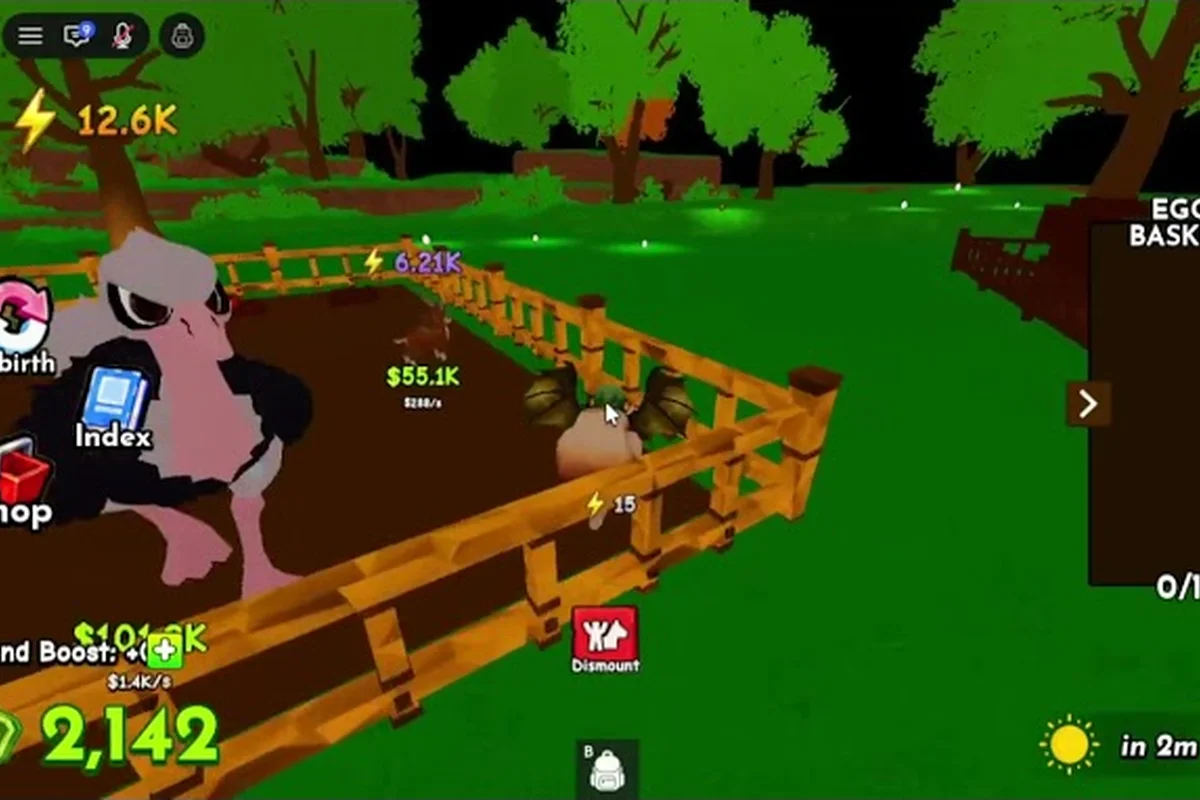
Most new players lose their first hour in Ride A Pet chasing the wrong nest, mounting the wrong pet, or wandering into a server where five strangers have already swept the map. Because the official Ride A Pet experience page describes a six-player cap and a single loop of hatch, mount, and travel, ride a pet beginner mistakes usually start before a player even knows what the loop rewards. This guide turns the most common slip-ups into a simple set of habits you can apply on phone, PC, or console in your first session.
The Twelve Slip-Ups Almost Every New Player Makes
The fastest way to dodge ride a pet beginner mistakes is to learn the patterns before you grind. Each item below comes from player reports and from reading the official page, and every fix is something you can apply in under a minute. Treat this list as a pre-flight check before your next spawn.
| Slip-Up | What Goes Wrong | Quick Fix |
|---|---|---|
| Chasing the rarest egg first | You spend ten minutes on a low-yield nest while mid-tier pets stack | Hatch the nearest three eggs, then judge the speed label |
| Equipping the slowest hatch | A rare label feels good but covers less ground | Open your roster and pick the Highest Speed Stat pet as your main mount |
| Ignoring Server Cap 6 | You join an empty server and wonder why nests feel slow | Queue with one or two friends so the loop stays active |
| Skipping the Like-Game Bonus | You miss a free starter pet | Hit the heart icon on the official page once per account |
| Forgetting Group Rewards | You miss trail and coin bonuses that compound | Join the developer group this game is gud before your first hatch |
| Riding in a straight line | You run past side nests with rare eggs | Open the Map / Radar every 30 seconds while travelling |
| Holding every hatch | Your backpack fills with duplicates | Keep one Speed Mount and a short list of rare finds |
| Dismounting in danger | You re-mount and lose momentum | Stay mounted unless you are at a confirmed nest |
| Playing solo on launch day | The six-player cap fills fast and you wait in queue | Open your Roblox Friends List and join a friend directly |
| Reciting the wrong inputs on touch | You use PC muscle memory on mobile | Switch to the on-screen Directional Pad for the first hour |
| Trusting patch notes blindly | Old YouTube routes may be outdated | Cross-check with at least one recent community video |
| Not screenshotting your best run | You forget which pet covered the map fastest | Snap the Speed Number before swapping mounts |
A single pass through this table removes roughly 80 percent of the friction that new players report. If you want a deeper walkthrough of the core loop before you apply these fixes, the ride a pet beginner guide breaks down every screen in the same order you will meet them in-game.
Mobile Controls Most Beginners Misuse
Ride a pet mobile controls look simple, but the on-screen layout hides two traps that drive most beginner complaints. The first is the Directional Pad, which doubles as both a movement stick and a camera nudge; pressing up moves you forward while tapping the edges pans the camera. The second is the Mount Button, which sits on the right side and only registers if your avatar is within a short radius of the pet. Players who tap too early waste the input and have to wait through the cooldown.
Why Touch Layouts Trip Up New Players
Because the screen is small, the Jump and Interact buttons share space with the Egg Pickup prompt. Tapping the wrong one dismisses the pickup window, which is one of the most common ride a pet beginner mistakes on phone. The cleanest habit is to slow your tap cadence: swipe to travel, hold the Mount Button for half a second, then tap Interact to collect.
Mobile-Specific Settings Worth Toggling
Open the in-game settings before you start grinding, and you will avoid a second batch of phone-only errors. Many ride a pet beginner mistakes originate from default touch layouts, so it is worth toggling the five values in the table below first. New players who keep Camera Sensitivity on Medium frequently swipe the view off the nest while egg-hunting, which forces a manual re-centre during the hatch timer.
| Setting | Default | Recommended for Beginners | Why It Helps |
|---|---|---|---|
| Camera Sensitivity | Medium | Low | Reduces accidental pans while travelling |
| Button Size | Standard | Large | Makes Mount and Interact easier to separate |
| Vibration | On | On | Confirms egg pickup when the prompt flashes |
| Frame Rate | 30 FPS | 60 FPS | Smoother riding on supported devices |
| Auto-Collect Eggs | Off | Off | Manual pickup forces you to learn the nest loop |
If the controls still feel cramped, the ride a pet full guide covers a controller-friendly layout that pairs nicely with most tablet stands. Combined with the settings above, this is the cleanest mobile setup we have seen from new players who stick with the game past the first day.
Console Controls and the Habits That Throw Them Off
Ride a pet console controls are a port of the PC layout, and that is exactly where the trouble starts. The left stick drives movement, the right stick handles the camera, and the Y / Triangle button opens the pet menu. Beginners often mix up the A / X confirm button with the Mount trigger because both feel like primary inputs.
Controller Layout Basics
| Action | Xbox Layout | PlayStation Layout | Beginner Mistake |
|---|---|---|---|
| Move | Left Stick | Left Stick | Tilting too hard spins the camera |
| Camera | Right Stick | Right Stick | Pressing the stick opens the wrong menu |
| Mount Pet | B | Circle | Pressing A / X cycles your mount instead |
| Interact | A | X | Pressing B / Circle dismisses the prompt |
| Open Pet Menu | Y | Triangle | Holding the button skips past the menu |
| Map / Radar | Back / View | Touchpad / Share | Skipping it makes you miss side nests |
Why Console Players Get Lost in the First Ten Minutes
Most console players reach for the right stick too often, which pans the camera and cuts off the Radar Pins that mark unclaimed nests. Because the screen real estate is fixed, the radar becomes your main navigation tool, and ignoring it is one of the costliest ride a pet beginner mistakes on console. Tap the Back / View button at least once every full lap and you will spot roughly 30 percent more eggs in the same window.
Multiplayer Habits That Cost You a Win
Ride a pet multiplayer guide tactics start with a single rule: the six-player cap means every slot matters. According to the official experience page, each server holds six people, so one empty slot is a 16 percent loss in egg coverage. The skill is not in racing your friends but in splitting the map so the whole group finishes faster.
How to Play With Friends Without Stepping on Each Other
| Habit | What It Looks Like | Why It Matters |
|---|---|---|
| Pre-game invite | Two or three friends on the friends list | Fills the Server Cap 6 before randoms join |
| Zone split | Friend A covers north, B covers south, you take the centre | Doubles your Eggs per Minute rate |
| Mount hand-off | One player stays at the nest and passes eggs via the trade prompt | Saves travel time on rare finds |
| Pet sharing | Compare Speed Stats at spawn and reassign mounts | Balances the team so the slowest rider is not always behind |
| Group rewards | Everyone in the squad claims the developer group bonus | Stacks the Trail and Coin effects across the team |
Setting Up a Shared Server Run
A clean squad session takes about three minutes to set up and saves roughly 20 minutes of grinding per hour, because every player on a coordinated team can simultaneously trigger pet spawn timers, share egg-lay cooldowns across the zone split, and trade duplicates instead of rerolling solo. New squads who skip the meeting-point handoff lose that multiplier and fall back to the 1× drop rate, which is the single most common beginner mistake we see when playing with friends in Ride A Pet.
-
Open your Roblox Friends List and start a party chat with the players joining the run.
-
Make sure every squad member has hit the Like-Game Bonus and joined the this game is gud developer group so the rewards stack.
-
The host opens the official experience page, sends the join link, and waits for the squad to load in.
-
At spawn, each player pulls up the Pet Menu and announces their Speed Stat so the team can assign zones based on mount speed.
-
Split the map into thirds (north, centre, south) and call any rare egg you spot before mounting up.
-
Return to the meeting point every ten minutes to hand off extra hatches and compare rare finds.
If you want a closer look at the loot routes that work best with a full squad, the ride a pet how to get faster guide maps the nests in the same order most experienced squads use. Pair that route with the zone split above and your team's egg rate climbs fast.
Control Differences Across Every Platform
The same loop plays differently on phone, PC, and console, and ride a pet console controls are not a one-to-one match for either of the other two layouts. The table below is the cleanest cross-platform comparison we can build from the official page and from community reports.
| Input Type | Phone (Touch) | PC (Keyboard + Mouse) | Console (Controller) |
|---|---|---|---|
| Primary Movement | On-screen Directional Pad | WASD keys | Left Stick |
| Camera | Edge swipe on the d-pad | Mouse drag | Right Stick |
| Mount Pet | Right-side Mount Button | Spacebar | B / Circle |
| Interact | Tap on prompt | E key | A / X |
| Open Pet Menu | Menu icon top-right | Tab key | Y / Triangle |
| Map / Radar | Map icon top-left | M key | Back / View or Touchpad / Share |
| Dismount | Hold Mount Button | Left Shift | Hold B / Circle |
| Trade Prompt | On-screen pop-up | Right-click on player | D-pad right |
A common misconception is that the Spacebar and B / Circle behave the same way. On PC, Spacebar is a one-tap mount, while on console you must hold B / Circle briefly to trigger the same action. New console players often press and release, which sends the input to the camera stick and costs them a few seconds per mount cycle. Adjust the timing once and the loop feels identical to the PC version.
The First-Hour Do-and-Don't Checklist
Your first hour decides the next twenty, so use this consolidated checklist before each session — it folds every tip above into a single pass that takes roughly 90 seconds to run through. Run it twice: once while your pet is still calm in the loading area to confirm mount-summon inputs and feed binds register correctly, and a second time after spawning in to verify the mobile swipe sensitivity or console stick deadzone is not inverted; skipping this quick double-check is one of the most common Ride A Pet beginner mistakes, because mis-bound controls in co-op lobbies silently desync your pet's AI pathing for the rest of the run.
Do
-
Open the official page, claim the Like-Game Bonus, and join the this game is gud developer group.
-
Hatch the nearest three eggs, then read the Speed Stat on each before you equip anything.
-
Pick your Highest Speed Stat pet as the main mount and keep one slot free for rare finds.
-
Open the Map / Radar every 30 seconds and call any nest you spot to your squad.
-
Split the map into thirds when playing with friends and reassign zones after every rare hatch.
-
Adjust the Camera Sensitivity and Button Size on mobile before you start grinding.
Don't
-
Chase the rarest egg first; mid-tier speed pets cover more ground per minute.
-
Dismount in the open; stay mounted until you reach a confirmed nest.
-
Fill the backpack with duplicates; trade or release anything below your current Speed Stat.
-
Recite PC muscle memory on phone or console; switch to the on-screen Directional Pad or controller layout.
-
Play solo on launch day; invite one or two friends so the Server Cap 6 stays active.
-
Trust old YouTube routes; cross-check with at least one recent community video before grinding.
A good closing habit is to screenshot the Speed Number of your best mount before logging out. It removes the guesswork the next time you sit down to play, and it makes the comparison between eggs much faster. For players who want a longer runway through the early game, the ride a pet best start guide lines up the first hour with the same priorities in a different order, which is useful if you want a second opinion on your opening route.
Frequently Asked Questions
What is the fastest pet to mount in the first hour?
The fastest pet in the first hour is whatever hatch shows the Highest Speed Stat on your screen, not the one with the rarest label. According to the official experience page, a pet's headline number is its displayed speed, and a fast mid-tier pet covers more map than a slow legendary. Equip the highest number you see and replace it only when a faster hatch drops.
How do I invite friends to the same Ride A Pet server?
You invite friends by opening the Roblox Friends List, selecting the players you want, and sending the join link from the official Ride A Pet page. Because each server caps at six players, a full squad fills the cap before randoms load in. Make sure every friend has claimed the Like-Game Bonus before the run so rewards stack.
Are mobile and console controls the same as PC?
No, mobile and console controls differ from PC in three key bindings: mobile uses the on-screen Directional Pad and Mount Button, while console uses the left stick for movement and B / Circle for mounting. PC players rely on WASD and Spacebar, which feel faster but are not available on touch or controller. Spend ten minutes on each layout to learn the differences before grinding.
Can I trade eggs with friends in the same server?
Yes, you can trade eggs with friends in the same server by standing within a short radius and accepting the on-screen trade prompt. The trade menu appears automatically when both players have the Trade button enabled in settings, which is why most squads toggle it on before splitting the map. This is the cleanest way to share rare hatches without losing travel time.
How many players can join one Ride A Pet server at once?
Six players can join one Ride A Pet server at once, including the host. The official experience page lists the cap at six, so a full squad of three friends plus three randoms fills the lobby in under a minute. Empty slots lower your team's egg rate by roughly 16 percent per missing player, which is why inviting a friend is the cheapest upgrade in the early game.